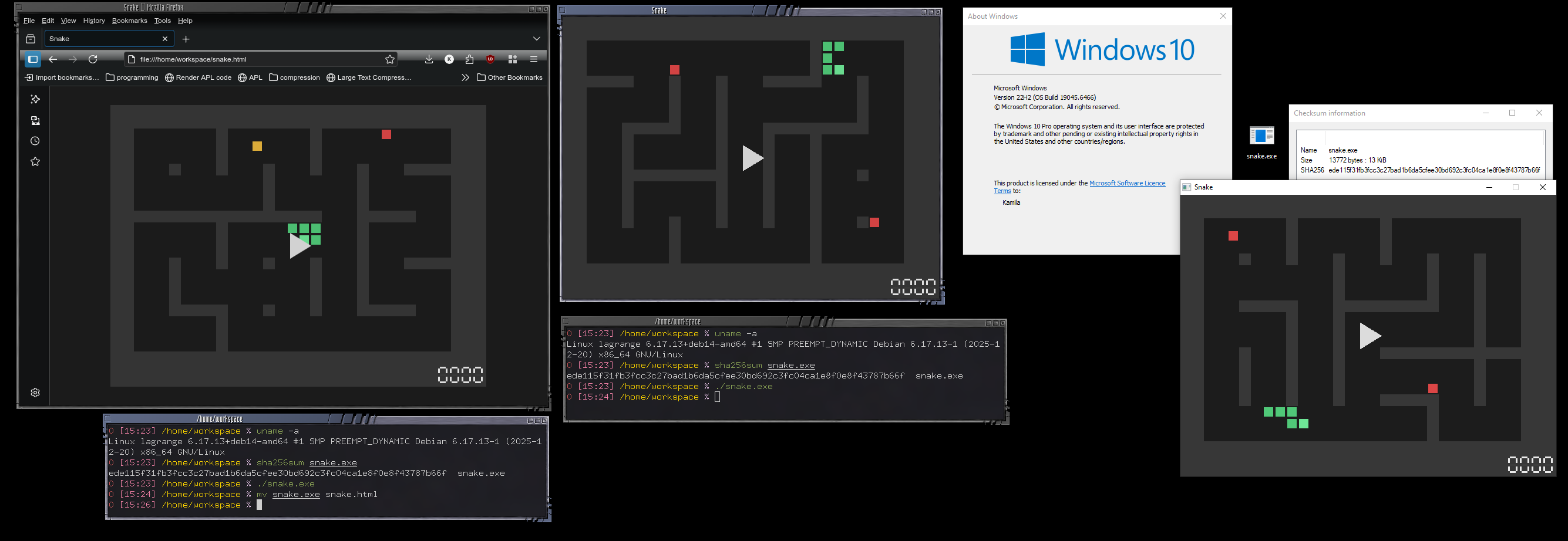
This game is a single 13 KiB file that runs on Windows, Linux and in the Browser.
Not that long ago I became aware of Justine Tunney’s cosmopolitan libc project. It’s a toolkit that allows you to compile C source code into a single binary that runs natively on multiple operating systems, including Windows, Linux, various flavours of BSD, even including booters.
Unfortunately, back then the project didn’t seem to support GUI interfaces and produces quite swollen binaries. Hence I decided to take a stab at a similar (simpler? harder? up to you to decide) challenge: create a video game (<16 KiB) that runs natively on Windows, Linux and in the Browser, all from a single source file.
The Game⌗
It’s a pretty standard Snake game with the same rules and interface on all platforms. You control a snake that grows longer as it eats food, and the goal is to avoid running into walls. The snake is controlled using either the arrow keys or WASD keys. It can be terminated via ESC (if permissible by the platform), reset via R, and paused via P. Spacebar starts the game.
The game keeps track of your score. Each piece of food eaten increases your score by 10 points, except yellow fruit (which spawns with a 15% chance) that gives you 20 points. Fruit spawns at a fixed rate and despawns after a certain time if not eaten. The despawn timer is proportional to the speed of the snake at the time of spawning, which itself is proportional to the snake’s length.
Once ten fruit are eaten, the game proceeds to the next level, randomizing the walls’ layout. The maze is created as to ensure that there is always a path from the snake’s head to any piece of food. The initial placement of the snake is also randomized, but always in a position that has at least five empty tiles in the direction the snake is facing.
Download the game here (13,772 bytes).
The Polyglot⌗
I implemented the game three times in total: once in C for the i686 Visual C platform using WinAPI, once in C for the x86_64 Linux platform using clang and X11, and once in JavaScript for the browser using HTML5 Canvas. Each implementation is around 3-5 KiB in size when compiled/minified.
The Windows implementation was produced using a compressing script that prepends a decompressing stub. This stub has a quite unusual PE header that has many freely controllable bytes after the MZ signature. This allows us to place a shell script there that skips over the remainder of the file, rendering the (valid) PE executable runnable on Windows while also making the entire file a valid shell script, that will do (thus far) nothing on Linux.
Because the PE file is so awkward, we rely on Windows’ apphelp mechanism. Without compatibility mode, executing for the first time will yield the message:
“The application was unable to start correctly (0xc0000005). Click OK to close the application.”
Which should disappear after re-running.
The Linux implementation was produced using a similar approach; we use lzma for decompression and a small shell dropper that extracts the compressed ELF64 binary and runs it, skipping over the head and the tail of the file.
The HTML version is also packed and abuses the fact that browsers will happily process all the benign garbage at the start of the file before reaching the actual HTML content. Then we make it invisible/unobtrusive through a bit of CSS magic.
Finally, we concatenate all three files together in such an order that each platform will pick the correct part of the file to execute. The final file is exactly 13,312 bytes in size.